
Blog
News and updates on our apps
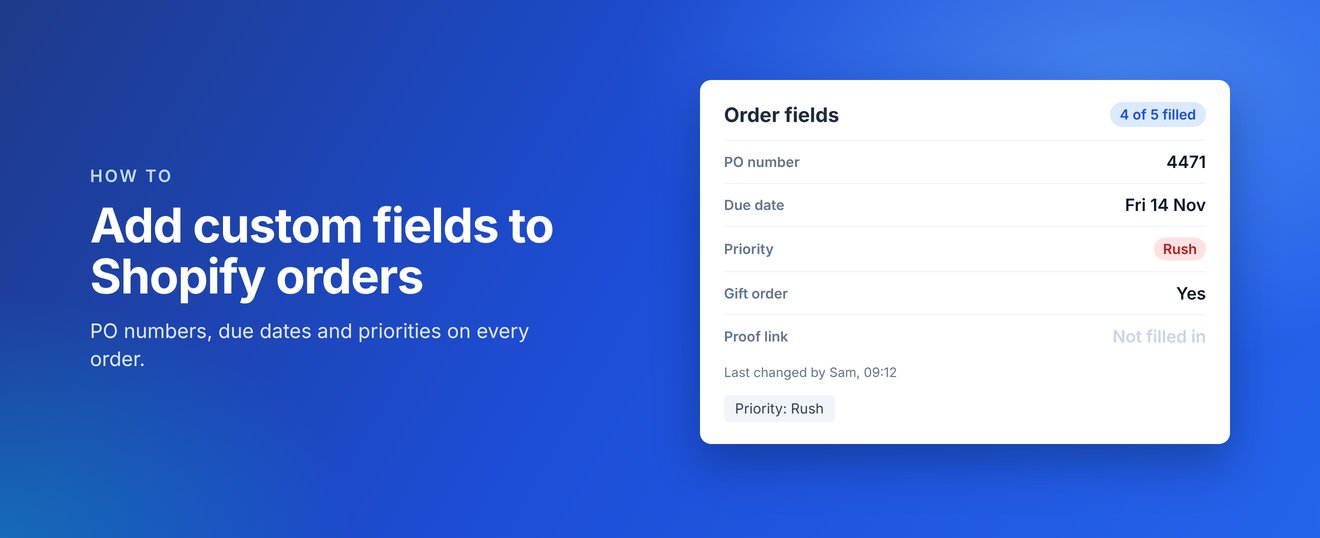
Shopify orders come with notes and tags, but there is no built-in place for details like a PO number, a due date or a priority. Here is how to add your own fields to every order with Notch: Order Fields, and use them to find orders later.
Why order notes and tags are not enough
Notes are free text, so every staff member writes them differently and you cannot filter by them. Tags work for filtering, but they are easy to mistype and they do not hold values like dates or numbers. Custom fields give each detail its own labelled place on the order.
1. Install Notch and choose your fields
Install Notch from the Shopify App Store and open it from Apps in your Shopify admin. Add the fields your team needs, or start with the suggested ones. There are seven field types:
- Text for short values, such as a PO number
- Paragraph for longer notes, such as production notes
- Number, such as the number of boxes
- Date, such as a due date
- Dropdown, such as Priority: Normal or Rush
- Yes/no, such as Gift order
- Link, such as a link to the customer's proof
2. Add the fields to your order page
Open any order, click + App block at the bottom of the page, choose Order fields and pin it. You only need to do this once: the block then shows on every order for your whole team.
3. Fill them in as you work
Staff fill in the fields on the order page. The block shows how many are filled in, and every change records who made it and when, for example "Last changed by Sam, 09:12".
4. Filter your Orders list by a field
Dropdown and yes/no fields can also be added to orders as ordinary Shopify tags, such as Priority: Rush. In Orders, filter by that tag and save the filter as a view. Because they are normal tags, Shopify Flow and other apps can use them too.
Notch costs $6.99 USD a month with a 14-day free trial, billed through Shopify. It works only inside your Shopify admin and does not read your customers' details.
Coming soon
Notch: Order Fields is coming soon to the Shopify App Store. Find out more at fields.zieasoft.com, read the Notch help guides, or see how it fits with our other apps on our apps page.